Learning Path screenshot template
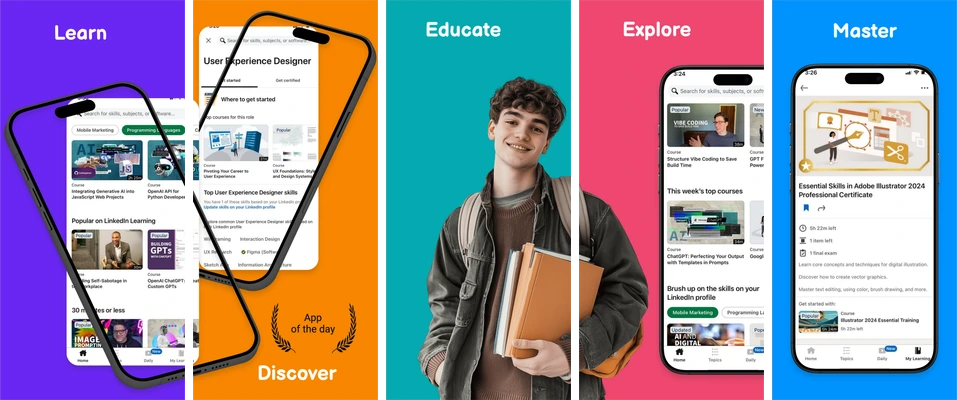
A vivid learning sequence mixing angled phones, a learner photograph and course screens.
Why this layout works
Single-word headings give the colored panels a simple rhythm. Angled devices and a central portrait add variety, so the app capture must remain large enough to understand.
Build a screenshot sequence
Use this suggested sequence as a writing brief, then adapt it to the features your app actually offers.
- Introduce learning
- Show discovery
- Explain a lesson
- Explore course content
- Show practice
Make it yours
Replace sample portraits and captures as appropriate for your app. Keep exercise text legible inside angled devices and avoid unsupported mastery claims.
Catalog preview with sample artwork and copy. Any ratings, awards, figures or testimonials in the design are placeholders to review, not Skir customer results.
Included and editable
- 5 portrait compositions at 1290 × 2796 pixels.
- Editable headline and supporting-copy text layers using Balsamiq Sans.
- Editable decoration, colors and device placement.
- Replaceable sample image layers; keep the internal artwork of each app capture intact.
Export and review
Export the first three boards on Free. Later editable compositions follow paid-plan access rules. Check the final text and app images at a small preview size before uploading your set to the store.
After replacing the sample artwork, export your set and use the local size checker. Review the release checklist for content and readability checks.
Can I change the sample screens and copy?
Yes. Open this existing library template, replace the sample images and edit the surrounding text, colors and placement. Keep each app capture intact and review every exported board.
Can I use this for Android?
This library template starts with an iPhone portrait target. Choose Google Play in the platform selector to create Android boards, then inspect the adapted layout and exported dimensions. The Google Play reference explains the relevant file requirements.